Payt uses the OAuth2 Authorization Code flow for the authorization process of its public API. When unable to support OAuth2, it is also possible to use a static API token. This approach is less secure though.
In order to start the authorization process you need to have an application. Check there how to create one if you didn’t do so already.
1

Start the authorization

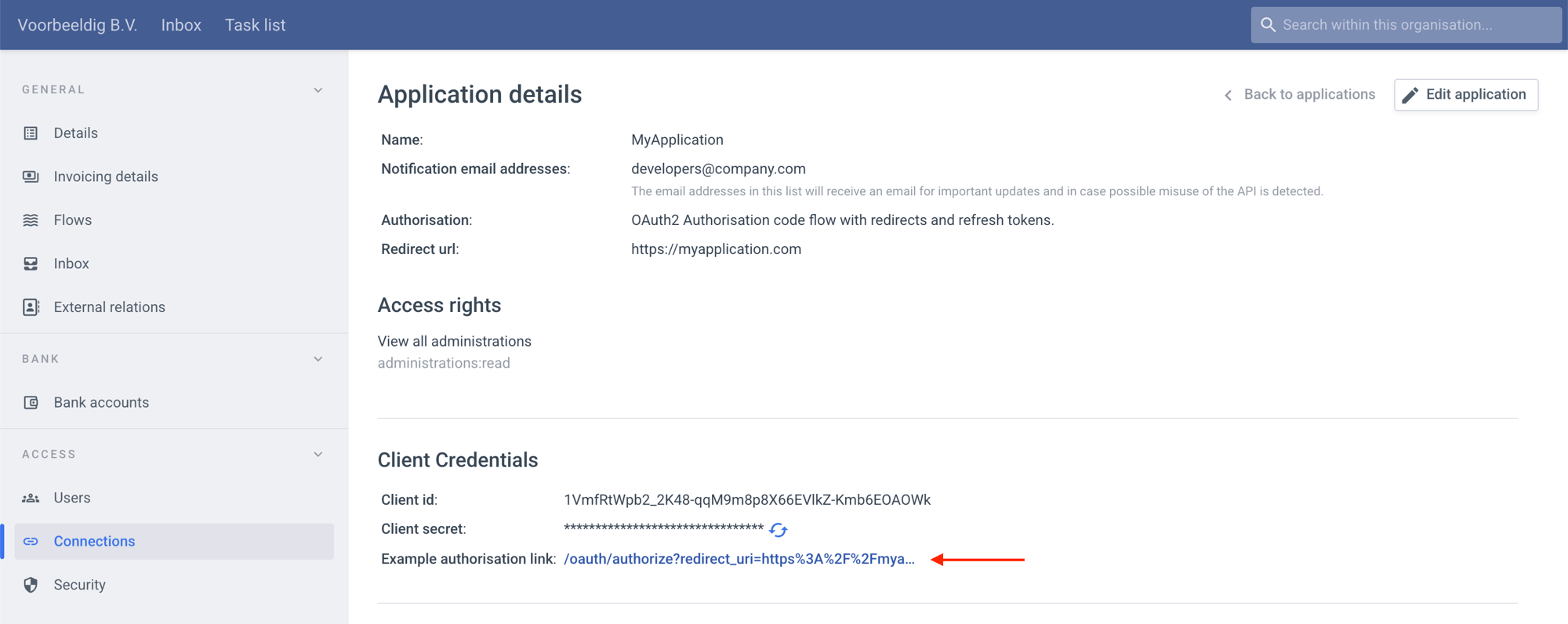
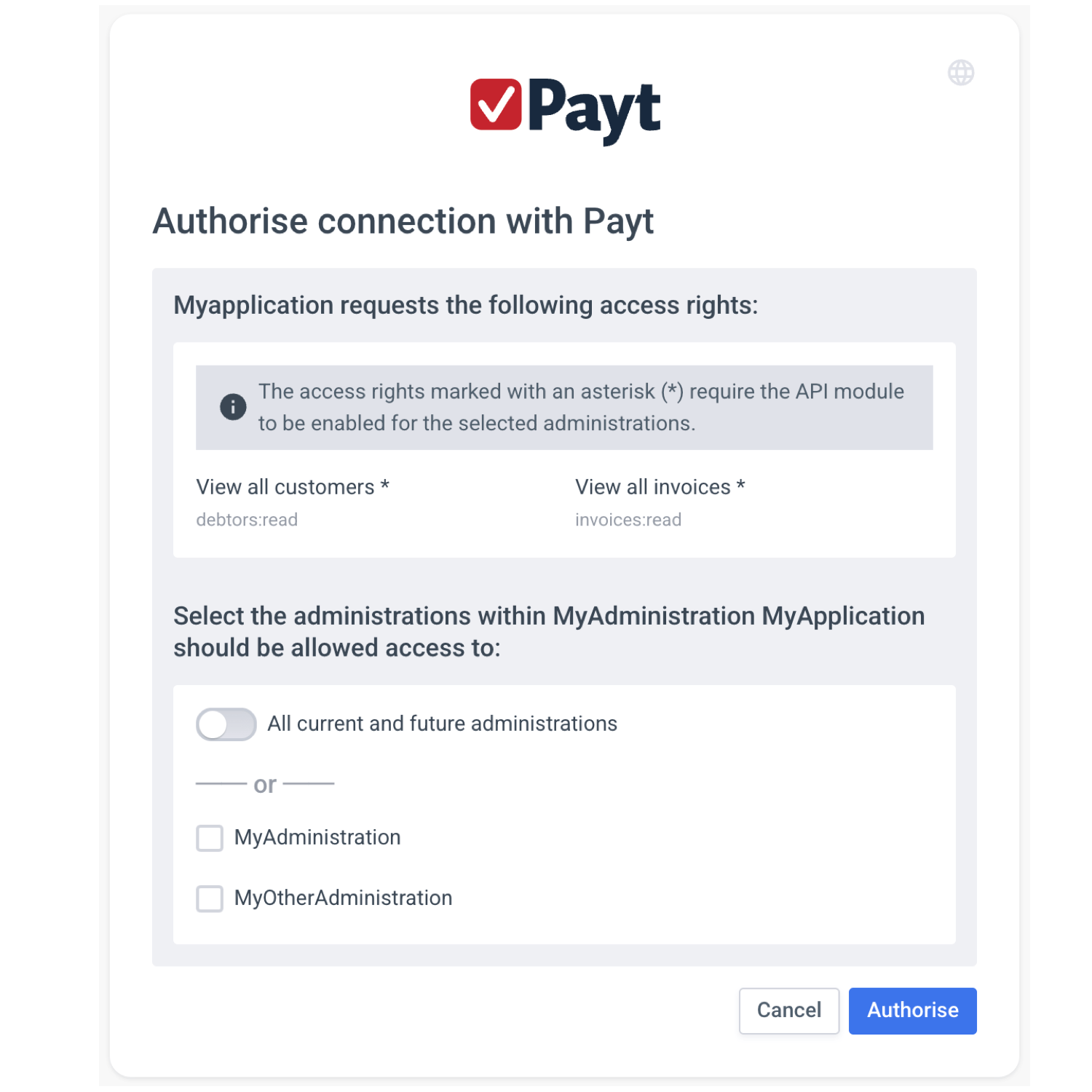
Your users should be able to start the authorization process from within your app. A button or link should take them to the authorization form.Here users can authorize your app to access their Payt company. They see the list of permissions your app requests and they can select which administrations they grant access to. Or they can allow your app access to all current and future administrations of their company.If the user is already logged into their Payt user account they are immediately directed to the authorization form. Otherwise they have to go through the regular Payt login first.When editing an application, you’ll find an example authorization link that takes you to the authorization form your users will see. The url contains all parameters the server requires.Request initiated by the client:
GET https://app.paytsoftware.com/oauth/authorize?redirect_uri=https%3A%2F%2Fexample.com%2Fcallbacks%2Fpayt&response_type=code&client_id=q-QynnbDDXVFJCHUPg58EWHH2n5kCWaWYeJ5lVQNI7A&scope=debtors%3Aread%20invoices%3Aread&state=mbjk17r01c
ParameterPresenceDefinition
client_idrequiredThe client_id of the application.
redirect_urirequiredThe URL your users are sent to after they complete the authorization process.
response_typerequiredMust be: code
staterequiredRandom set of characters. This value will be returned by the Payt server and should be validated on the client side to prevent CSRF attacks.
scopeoptionalWhen the parameter is not supplied, the scopes as defined by the application will be used. When the parameter is present, it must contain a subset of the scopes defined by the application. When multiple scopes are supplied, they must be joined into a single String separated by spaces.
2

Confirm the authorization

After submitting the authorization form, the server will redirect the user to the redirect_uri you provided.The state value that was provided by the client is returned and must be checked by the client in order to prevent attackers from initiating requests.Payt will add the code parameter to the redirect_uri. The client must then complete the authorization process by sending a POST request to the token endpoint (/oauth/token). This request must include the code that was just received. The server will then generate the first token and return it in the response.
The code expires after 10 minutes. If the client fails to fetch the first token within that window, the authorization process fails and the user has to go through it again.
Request initiated by the server
GET https://example.com/callbacks/payt?code=lupjwsFG3RMGoIJAKkQBMGjs4bDuW4OP3NAqv_2XZ5o&state=mbjk17r01c
Your app must make the following request
POST https://api.paytsoftware.com/oauth/token
Authorization: Basic cS1ReW5uYkREWFZGSkNIVVBnNThFV0hIMm41a0NXYVdZZUo1bFZRTkk3QTpNcTRFMlZGTnNzcjVpQTdaN0xBZFM4MnZtNTl3Qm9nNVE1SGw2Si1Pc0w0

{
  "code": "lupjwsFG3RMGoIJAKkQBMGjs4bDuW4OP3NAqv_2XZ5o",
  "grant_type": "authorization_code",
  "redirect_uri": "https://example.com/callbacks/payt"
}
HeaderPresenceDefinition
AuthorizationrequiredBasic
ParameterPresenceDefinition
coderequiredMust be the code that was included in the url.
grant_typerequiredMust be: authorization_code
redirect_urirequiredThe URL your users are sent to after they complete the authorization process.
Response from the server
{
  "access_token": "IBzLDErQvt9gOmSLarUtDy06emduHZmKEG2OSPdHpJ8",
  "created_at": 1585820684,
  "expires_in": 7200,
  "refresh_token": "2_L56FQ1Sl6db15XJuO14KysWEwGhwaMsVeUegGBxfI",
  "scope": "invoices:read debtors:read",
  "token_type": "Bearer"
}
KeyValue
access_tokenThe token that can be used to authenticate API requests.
created_atThe unix time at which the token was created.
expires_inThe number of seconds the access token is valid.
refresh_tokenThe new refresh_token, must be used to create the next token.
scopeList of granted permissions.
token_typeWill always be Bearer.
3

Store the tokens

At the very minimum your app must store the access token and refresh token. The access token is required to use the API, the refresh_token to create a new token. It is recommended to also store the expiration time of the access token. It allows you to request a new token just before the current token expires, minimizing the number of requests needed.More information on how to use tokens can be found here.

Re-authorization

After the authorization process has been completed, it can always be started again. When completed, all tokens from the previous authorization are immediately removed. Also the previously granted scopes and administrations are removed and replaced by what is authorized during this last process. Under normal conditions it should not be required for a user to go through this process more than once. It can however be initiated by the client when the refresh_token is lost or when it expired.
Last modified on June 12, 2026